

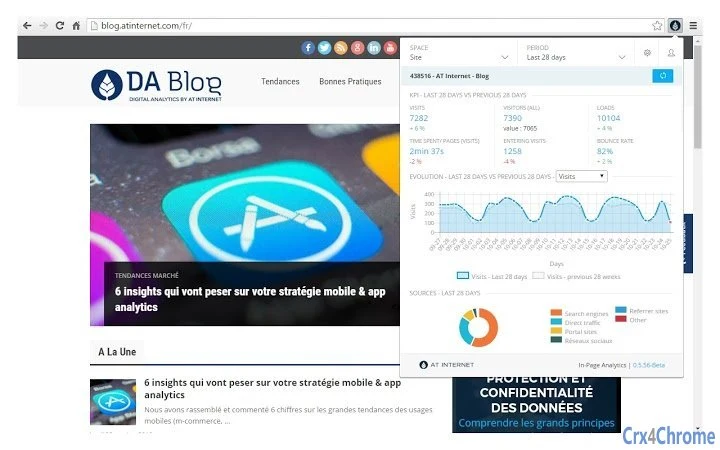
Description
In-Page Analytics for Web Insights
The AT Internet In-Page Analytics extension provides real-time insights into the active web page within the browser. Designed for professionals who analyze user behavior and page performance, it enables users to monitor key metrics directly on the page without leaving the current context. The tool supports both a popup view and integration with Chrome DevTools (F12), allowing continuous visibility during navigation. This functionality is particularly useful for web analysts, UX researchers, and digital marketers who need immediate access to data while reviewing site elements. The extension is tailored for users with an existing AT Internet account, ensuring secure access to analytics data. It is intended for use in development, testing, and optimization workflows where understanding page-level interactions is critical. The tool does not require additional setup beyond installation and account authentication.
Key Features & Capabilities
- Real-time In-Page Data Display – View key analytics metrics directly on the active web page, enabling immediate analysis of user interactions and page elements.
- Popup View Integration – Access analytics data through a compact popup window that appears on demand, ideal for quick checks during browsing.
- Chrome DevTools Compatibility – Use the extension within the Chrome DevTools panel (activated via F12), allowing persistent monitoring across page transitions.
- Account-Based Access – Requires a valid AT Internet account to authenticate and retrieve analytics data, ensuring data security and user-specific insights.
- Seamless Navigation Support – Maintains visibility of analytics data during navigation, reducing context switching and improving workflow continuity.
These capabilities support professionals in identifying high-traffic elements, tracking conversion paths, and validating tracking implementation. For example, a UX researcher can inspect a landing page and instantly see which buttons generate the most clicks. A developer can verify that tracking tags are correctly firing without leaving the development environment. The extension enhances analytical workflows by integrating directly into the browser’s native tools, minimizing disruptions.
User Interface, Workflow & Performance
The extension features a clean, minimal interface designed for efficiency. The popup view offers a streamlined layout focused on essential metrics, while the DevTools integration provides a more detailed panel for advanced users. Navigation is intuitive, with quick access to data through the browser toolbar or DevTools menu. The workflow is optimized for professionals who frequently switch between development, testing, and analysis tasks. The extension operates without requiring constant user input, allowing data to update dynamically as the page loads or changes. Performance observations are based on general software behavior patterns. The developer did not specify resource usage details. Stability is expected to be consistent with standard browser extensions, though actual behavior may vary based on system configuration and page complexity.
Compatibility & System Requirements
The AT Internet In-Page Analytics extension is compatible with Windows and Mac operating systems. It is designed to run within the Chrome browser environment. The installation size is 2.1 MB, indicating a lightweight footprint. The extension requires a valid AT Internet account for full functionality. Exact system requirements were not listed. Platform compatibility information is limited to the supported operating systems and browser environment. No additional hardware specifications were provided. The extension does not require elevated permissions beyond standard browser access.
Pros and Cons
Pros
- Real-time analytics displayed directly on the web page
- Supports both popup view and DevTools integration
- Enables continuous monitoring during navigation
- Lightweight at 2.1 MB
- Secure access via AT Internet account
Cons
- Requires an AT Internet account to function
- No standalone functionality without account
- Limited to Chrome browser environment
- Exact performance impact not specified
- Platform compatibility limited to Windows and Mac
FAQ Section
Is the AT Internet In-Page Analytics extension free to use?
Yes, the extension is available at no cost. It is offered as a free tool for users with an AT Internet account.
Which operating systems does the extension support?
The extension is compatible with Windows and Mac operating systems.
Do I need a special license or subscription to use this tool?
Yes, a valid AT Internet account is required to access and use the analytics data provided by the extension.
Can I use this extension offline?
The extension requires an active internet connection and a valid AT Internet account to retrieve analytics data. Offline usage is not supported.
How often does the extension update its data?
Data is updated in real time as the page loads or changes, ensuring current insights during navigation and interaction.
Final Thoughts + CTA
The AT Internet In-Page Analytics extension delivers a focused, efficient solution for professionals who need immediate access to page-level analytics. Its dual-view functionality—popup and DevTools—ensures flexibility across different workflows, while the real-time data display enhances decision-making during development and testing. Although it requires an AT Internet account and is limited to Chrome, its lightweight design and seamless integration make it a valuable tool for digital analysts and developers. The extension excels in providing contextual insights without disrupting workflow. Download AT Internet In-Page Analytics now.
Guides & Tutorials for AT Internet In-Page Analytics Extension for Chrome
How to install AT Internet In-Page Analytics Extension for Chrome
- Click the Preview / Download button above.
- Once redirected, accept the terms and click Install.
- Wait for the AT Internet In-Page Analytics Extension for Chrome download to finish on your device.
How to use AT Internet In-Page Analytics Extension for Chrome
This software is primarily used for its core features described above. Open the app after installation to explore its capabilities.
User Reviews for AT Internet In-Page Analytics Extension for Chrome 0
No reviews found





